Call Flow Designer: advanced call automation for your phone system
From call to resolution — drag, drop and automate complex call scenarios. Call Flow Designer is the visual tool built into DRIN PRO that lets you create intelligent call flows with no plugins or third-party tools required.
What is Call Flow Designer?
Call Flow Designer (CFD) is the visual call automation tool built into the DRIN PRO cloud phone system. With an intuitive drag-and-drop interface and support for conditions, loops and variables, it lets you design custom call flows that automate your business logic — without writing a single line of code.
CFD leverages native PBX components such as Business Hours, IVR, Menu, Prompts, Dial by Number, Text-to-Speech and many more — all fully compatible with external CRMs and databases — to automate scenarios like VIP routing, time-based promotions, PIN checks and dynamic call distribution.
From initial call entry to dynamic routing and post-call actions, Call Flow Designer helps agents manage calls more efficiently and customers reach the right destination faster.
Key highlights
- Built-in visual drag-and-drop interface
- 20+ ready-to-use native action blocks
- CRM, database and developer API integration
- Ready-to-use templates for common use cases
- Practical import & export support for flows

Call Flow Designer is included in the DRIN PRO Ultimate Plan
Unlike the core phone system features, Call Flow Designer is reserved for the DRIN PRO Ultimate Plan — the flagship tier of the platform, unlocking visual call automation, CRM and database integrations and dedicated developer blocks. Our sales team will help you evaluate the right upgrade for your business.
How does it work?
Once you are familiar with the building blocks of Call Flow Designer, you can easily construct an end-to-end automated call flow by dragging components into the design area.
Stage 1 — Pre-call handling
Define rules based on caller ID, dialed DID, business hours and more. Route incoming calls dynamically by time, location or identity.
Stage 2 — In-call handling
Use actions like Prompts, Menus, User Input and Transfer to manage the live call. Set up linear, branching or looped logic depending on the workflow.
Stage 3 — Post-call actions
Trigger follow-ups such as sending emails, pushing data to CRMs, or generating dynamic auto-responses via Text-to-Speech. Developer blocks extend your workflow beyond the call.
Stage 4 — Save and deploy
Once the flow is designed, simply save and publish it. The call flow can then be applied to a specific phone number or entry point. Every flow is fully visual, editable and adaptable.
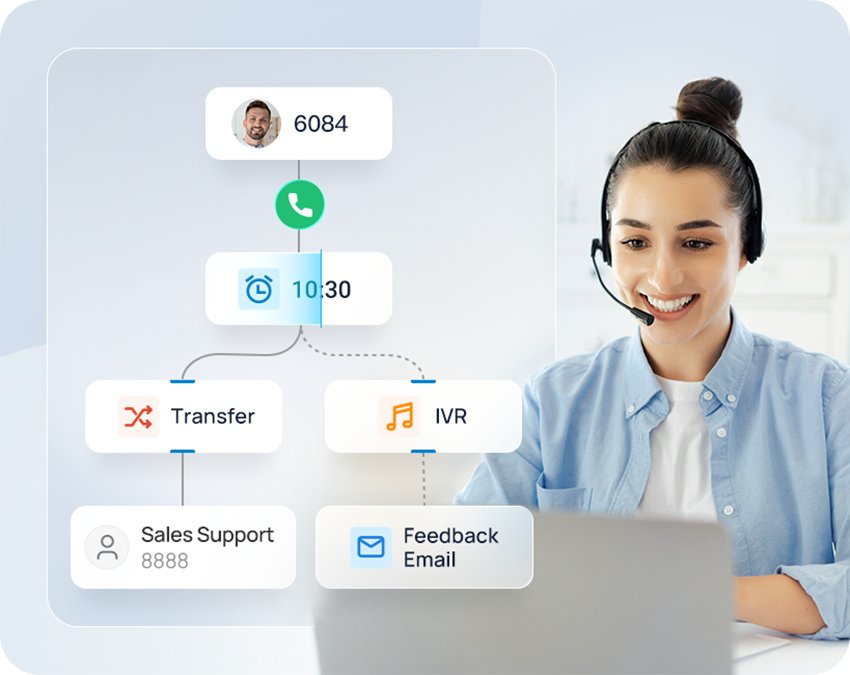
A real flow is built exactly like this: visual blocks connected to one another, dragged and published without writing code.
Call Flow Designer application scenarios
Three of the most requested use cases from businesses running Call Flow Designer on DRIN PRO: each scenario starts from a concrete need and is solved by combining a few visual components.
Call routing for multi-site offices
You operate multiple offices across different regions, each with its own DID number and local business hours: you want calls answered during opening hours and automatically redirected the rest of the day.
Assign a Business Hour component to each DID: during opening hours calls follow the normal workflow, the rest of the day they are automatically routed to an IVR playing a custom message. One unified strategy, tuned to every location.
Linear call flow for quick call distribution
You need a simple, efficient way to route incoming calls to the right team — Sales or Support — without keeping anyone waiting.
With the drag-and-drop Menu and Transfer components you can build a linear call flow in minutes: callers press 1 for Sales, 2 for Support and, if no one answers, the system automatically sends them to voicemail. Fast to set up, easy to maintain.
Voice-driven automated assistant
In many routine scenarios you want customers to get quick answers without waiting for an agent: order status, account balance, service availability.
Build an intelligent assistant that queries your internal systems (CRM, ERP, order management) via HTTP requests and turns the retrieved data into dynamic, personalized Text-to-Speech messages: “Your order #2356 has been shipped and will arrive tomorrow”. Smart, consistent and efficient self-service for every caller.
Call Flow Designer components
Every call flow is built by combining ready-made components. Explore the available components by category and click on each one to find out what it does and the benefits it offers.

Benefits of Call Flow Designer
For businesses
- Easy to use without technical skills
- Clear call flows for consistent customer handling
- Higher agent efficiency through automated tasks
- Smart voice interaction using built-in blocks
For resellers and service providers
- Fast project rollout with reusable templates via import/export
- Lower maintenance cost with drag-and-drop setup and no complex coding
- Professional delivery with sharable visual flowcharts
- Integration ready with CRMs and databases for advanced workflows
Frequently asked questions
Does Call Flow Designer support templates?
Yes. Call Flow Designer provides ready-to-use templates — such as Linear Call Flow, Time-based Routing and more — to help you get started quickly. You can also export and import call flow files to easily reuse and replicate flows across systems.
How many call flows can be created on one phone system?
Up to 80 active call flows per phone system, each with a maximum of 200 branches — conditions, loops and variables included: ample flexibility to design both simple and complex workflows.
What plan is required to use the Call Flow Designer?
Call Flow Designer is available exclusively with the DRIN PRO Ultimate Plan. To enable the feature, check the requirements or learn about upgrade options, please contact our sales team.
Do I need programming skills?
No. The interface is fully visual: drag components into the design area and connect them to define conditions, loops and variables. Dedicated developer blocks exist for advanced automations, but the vast majority of flows are built without writing any code.
Can I connect Call Flow Designer to my CRM or database?
Yes. Call Flow Designer integrates with external CRMs and databases through dedicated components and HTTP requests: you can route callers based, for example, on the billing status stored in your CRM, or read out an order status with a voice generated on the fly by Text-to-Speech.
How quickly does a flow go live?
Right after publishing: once the flow is designed, just save and deploy it, mapping it to a specific phone number or entry point. Every flow remains fully editable, so you can update it at any time without interrupting the service.
Can I try Call Flow Designer before enabling it?
Yes: our team can show you Call Flow Designer in action with a free demo and help you identify the most useful flows for your business. Contact us to book a no-obligation appointment.
Design your call flow from here
Easily drag, drop and deploy your call workflows — from basic routing to complex CRM-integrated logic. Call Flow Designer is included in the DRIN PRO Ultimate Plan: request a demo and find out what it can do for your business.
Request a demo